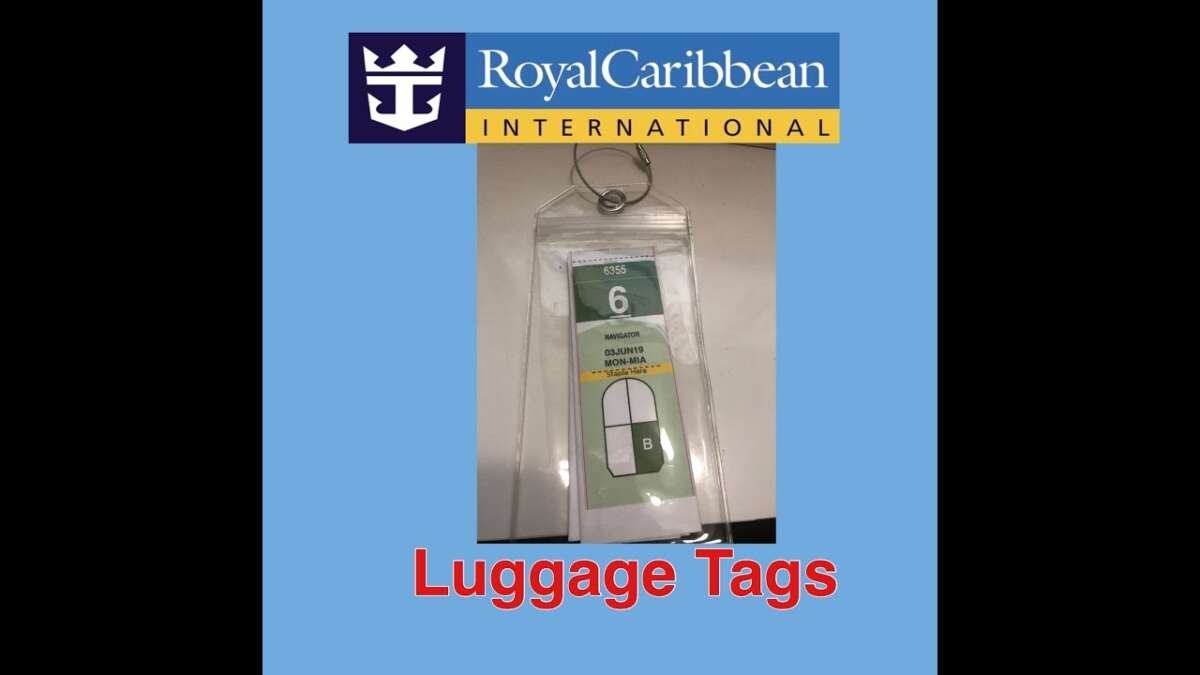
If you are sailing from a U.S. cruise port, print your Royal Caribbean luggage tags from your cruise documents, fold them along the marked lines, and secure one tag around each checked bag’s handle. The tag should show your name, ship, sailing date, and stateroom information clearly.
Use tape, a stapler, or a reusable cruise luggage-tag holder to keep the tag attached. Do not cover the barcode or important text.

What Is a Royal Caribbean Luggage Tag?
A Royal Caribbean luggage tag is a printed identification strip used by port staff and the ship’s baggage team. It helps route your checked luggage to the correct ship and stateroom.
Your tag may include:
- Your name
- Ship name
- Sailing date
- Stateroom number or assignment
- Deck information
- Luggage-routing details
- A barcode or machine-readable code
Royal Caribbean normally makes luggage tags available through your online check-in documents or electronic cruise documents. The exact layout may change, so follow the fold marks printed on your current tag.
A luggage tag is for checked bags that you give to porters at the terminal. Keep your carry-on bag with you. Your carry-on should contain items you may need before your checked luggage reaches your stateroom, such as medication, identification, travel documents, valuables, and a change of clothes.
How to Fold a Royal Caribbean Luggage Tag
Follow these steps after downloading and printing your tag.
1. Print the tag at full size
Print the luggage tag on standard letter-size paper, which is 8.5 by 11 inches in the United States.
Before printing:
- Use a clear, black-and-white or color print.
- Select Actual Size or 100% scale.
- Do not choose Fit to Page if it makes the tag smaller.
- Make sure the text and barcode are sharp.
- Print one tag for each checked bag.
If the tag is split across several pages, print all pages that belong to the same luggage tag. Do not cut away information that appears near the edges.
2. Fold along the marked lines
Place the printed side face up. Fold the paper at each line shown on the Royal Caribbean luggage tag.
Most cruise luggage tags use a long strip that folds into a smaller, stronger band. The goal is to make the tag compact while keeping the identifying information visible on the outside.
As you fold:
- Fold the first panel along its printed line.
- Continue folding the remaining panels in the order shown.
- Press each crease firmly with your fingers.
- Leave the final strip long enough to wrap around the bag handle.
Do not fold through the main name, stateroom, ship, or barcode area unless the printed design specifically tells you to do so.
3. Create a firm band
After folding, the paper should form a narrow luggage-tag band. The information should remain readable from the outside.
If the tag has a section that says fold here, staple here, or attach to handle, use that section as the final overlap point. If the instructions on your tag differ from the steps above, the printed instructions take priority.
4. Place the tag around the bag handle
Thread the folded band around a fixed handle on your suitcase. The best attachment point is usually the main top or side handle.
Avoid attaching the tag to:
- A loose zipper pull
- A removable strap
- A decorative handle
- A handle that retracts fully into the suitcase
- A part that can catch on conveyor equipment
The band should sit close to the handle base without blocking the handle’s movement.
5. Secure the overlap
You have three practical options.
Option 1: Use a stapler
Staple the two ends of the tag together after wrapping the band around the handle. Place staples only in the blank overlap area.
Use two staples if the paper overlaps enough to support them. Keep the staples away from the barcode, stateroom details, and the handle’s moving parts.
Option 2: Use clear tape
Wrap strong clear tape around the overlap. For better protection, cover the front and back of the paper, but do not place cloudy or heavily wrinkled tape over the barcode.
Tape can work well for a short trip from your home to the port. However, a paper tag covered with tape is still less durable than a reusable tag holder in rain or rough baggage handling.
Option 3: Use a cruise luggage-tag holder
A reusable plastic or vinyl cruise tag holder can protect the printed paper and usually uses a loop, clasp, or wire attachment.
Choose a holder that:
- Fits the folded tag
- Has a secure loop or clasp
- Keeps the barcode visible
- Does not force the paper to bend sharply
- Attaches to a fixed suitcase handle
A holder is optional. Royal Caribbean does not require you to buy one if your paper tag is folded and secured correctly.

How the Folded Tag Should Look
A correctly folded Royal Caribbean luggage tag should meet four basic checks:
- It forms a closed band around the handle.
- Your name and cruise details can be read.
- The barcode is not hidden, torn, or covered by glare.
- The tag does not slide off when you lift the suitcase.
Give the bag a gentle lift by its attached handle before leaving home. If the tag shifts, add another staple, more tape, or a stronger holder.
Do not rely on the tag alone for identification. Add your name and phone number to the suitcase’s built-in identification card or a separate luggage tag. Avoid displaying unnecessary personal information, such as your full home address, in a place visible to the public.
Where to Get Royal Caribbean Luggage Tags
Royal Caribbean usually provides luggage-tag instructions through its website, online check-in process, or electronic cruise documents. Sign in to your Royal Caribbean account and open the documents for the specific sailing.
Look for a section labeled similar to:
- Cruise documents
- Guest documents
- Luggage tags
- Set sail pass
- Online check-in
The location can change when Royal Caribbean updates its website or mobile tools. If you cannot find the tags, check whether:
- Online check-in is complete.
- Your stateroom has been assigned.
- Your cruise documents are available.
- You selected the correct sailing.
- Your browser opened the full document rather than only the first page.
- A pop-up window or download was blocked.
Use the luggage-tag information for the exact sailing. Do not reuse a tag from an older Royal Caribbean cruise, even if the ship is the same.

When Should You Attach the Tags?
Attach your luggage tags shortly before leaving for the cruise terminal. This reduces the chance that the paper will tear during airport travel, hotel stays, or ground transportation.
A practical schedule is:
- Print the tags at home.
- Pack them flat in your travel folder.
- Attach them the night before the cruise or on the morning of departure.
- Check the tags again before handing bags to the porters.
If you are flying to the port, do not attach the cruise tag before your flight unless you are sure the bag will not be checked with the airline. Airline baggage tags and cruise luggage tags serve different purposes.
At the terminal, porters may ask you to show your cruise documents or confirm your stateroom. Keep those documents accessible while you hand over checked bags.
What If You Do Not Have a Printer?
You still have several options if you cannot print your Royal Caribbean luggage tags at home.
Ask the porters at the terminal
Porters at many cruise terminals can provide blank tags or write the required information on a tag. Have your name, ship, sailing date, and stateroom details ready.
This option may be slower during busy arrival periods. It is better to print the tags in advance when possible.
Use a hotel or library printer
A hotel business center, public library, office-supply store, or local print shop may be able to print the document. Confirm that the page prints at its original size.
Contact Royal Caribbean before travel
If your documents are missing or the stateroom information looks wrong, contact Royal Caribbean through its official support channels or ask your travel advisor. Do not guess your stateroom number.
If Royal Caribbean has not assigned your stateroom, follow the instructions shown in your documents. Some bookings may use a pending or guaranteed-stateroom status until the cruise line assigns the room.

Common Royal Caribbean Luggage-Tag Mistakes
Small errors can make a tag hard to scan or easy to lose. Avoid these problems.
Printing at the wrong scale
A tag printed too small may be difficult to read. A tag printed too large may not fold as designed.
Fix: Use the original page size and print at 100% whenever possible.
Folding over the barcode
A deep crease across a barcode can make scanning harder.
Fix: Follow the printed fold lines and keep the barcode flat and visible.
Using only one weak piece of tape
A single short strip of tape may loosen when the paper gets wet or rubs against other bags.
Fix: Cover the overlap securely or use two staples in the blank area.
Attaching the tag to a zipper
Zippers move and can separate from the main bag. A tag attached there may be lost.
Fix: Use a fixed handle or a secure reusable holder.
Covering the tag with opaque material
Dark tape, stickers, or a closed holder can hide important details.
Fix: Keep the name, ship, stateroom, and barcode visible.
Attaching the tag too early
Paper tags can tear during a flight or hotel transfer.