
Yes, AirTags are generally allowed in checked luggage when their small battery meets airline and FAA rules.
If you are wondering, “are AirTags allowed in checked luggage,” the answer is usually yes, but a few battery and airline rules matter. An AirTag can help you find a delayed or misplaced suitcase, yet it is not a GPS device and cannot replace normal baggage tags or travel insurance. This guide explains the rules, limits, safety steps, and best ways to use an AirTag while flying.

Are AirTags allowed in checked luggage?
Yes, AirTags are allowed in checked luggage on most flights in the United States. The Federal Aviation Administration permits small baggage tracking devices with lithium batteries, provided the battery stays within the permitted limit.
An AirTag uses one CR2032 lithium coin battery. This battery contains far less lithium than the maximum allowed for many small tracking devices. For this reason, an AirTag usually meets the battery rules for checked bags.
The Transportation Security Administration also allows AirTags in both checked and carry-on bags. Still, airline policies can be stricter than federal rules. Always check your airline’s current dangerous goods or battery policy before you travel.
When asking, “are AirTags allowed in checked luggage,” remember these points:
• The AirTag must be a small tracking device.
• Its battery must stay within the airline’s lithium battery limits.
• The AirTag should be protected from damage.
• The airline may apply additional rules.
• Spare batteries should stay in your carry-on bag.
Why AirTags are permitted in checked bags
AirTags are small Bluetooth tracking devices. They do not have cellular service, Wi-Fi, or a large rechargeable battery. Their CR2032 coin cell is low power and contains a very small amount of lithium.
The key safety issue with lithium batteries is the risk of heat, damage, or fire. Large lithium-ion batteries can create more concern in the cargo hold. An AirTag battery is much smaller and falls below the common lithium battery limits used for personal electronic items.
An AirTag also sends a low-power Bluetooth signal. Nearby Apple devices can detect that signal and update the item’s location through the Find My network. This means your AirTag does not actively connect to a satellite or mobile tower.
That design is one reason AirTags are treated differently from larger electronic devices, power banks, and spare rechargeable batteries.
What the FAA and airline rules say
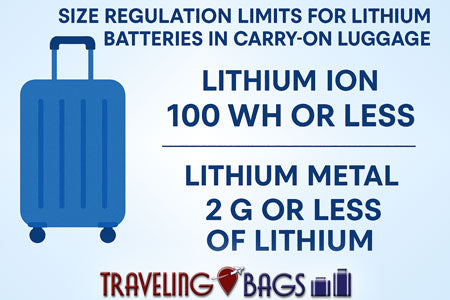
The FAA permits baggage tracking devices in checked luggage when they use a lithium metal battery with no more than 0.3 grams of lithium, or a lithium-ion battery rated at no more than 2.7 watt-hours. A standard AirTag battery is below the lithium metal limit.
This makes the answer to “are AirTags allowed in checked luggage” generally positive for flights departing from or traveling within the United States.
However, rules can vary by country and airline. Some carriers may ask passengers to keep electronic devices in carry-on luggage. Others may allow tracking devices in checked bags but require the device to be protected against accidental activation or damage.
Before flying, check:
• The airline’s lithium battery policy.
• The rules for your departure and arrival countries.
• Any special instructions for smart luggage.
• Whether your suitcase has a built-in battery or power bank.
An AirTag inside a normal suitcase is not the same as smart luggage with a large built-in battery. Smart luggage may need its battery removed before the bag can be checked.

Can an AirTag battery cause a checked-baggage problem?
An AirTag battery is unlikely to cause a problem when it is installed in the AirTag. The battery is small, sealed inside the device, and designed for low power use.
The bigger risk comes from carrying loose spare batteries. Spare lithium batteries should not go in checked baggage because they can short-circuit if they touch metal objects. Keep spare CR2032 batteries in your carry-on bag, ideally in their original package.
Take these precautions:
• Keep the AirTag inside a secure holder.
• Do not place loose batteries in the suitcase.
• Keep the AirTag away from sharp objects.
• Do not use a damaged or swollen battery.
• Replace an old battery before a long trip.
• Cover spare batteries so the terminals cannot touch.
If airport staff inspect your bag, a visible AirTag holder and clear luggage label can make the situation easier. The AirTag itself is rarely the issue. Confusion usually comes from spare batteries or larger electronic items packed nearby.

Are AirTags allowed in checked luggage on international flights?
AirTags are allowed in checked luggage on many international flights, but international rules are not identical. Airlines and national aviation authorities may interpret battery rules in slightly different ways.
For example, an airline may follow International Air Transport Association guidance while also adding its own restrictions. The route, aircraft type, and local security rules can affect how your bag is handled.
If you are flying internationally, use this checklist:
-
Visit the airline’s official baggage and battery page.
-
Search for rules about lithium metal batteries and tracking devices.
-
Check both the departure and arrival countries.
-
Confirm whether your bag contains any other battery-powered device.
-
Keep the AirTag’s product details available on your phone.
Do not rely only on what another traveler experienced. Policies can change, and a rule that applies to one airline may not apply to another.

AirTag versus GPS tracker in checked luggage
An AirTag is not a GPS tracker. It uses Bluetooth and Apple’s Find My network to report its approximate location when another compatible Apple device comes near it.
This works well in airports, baggage rooms, hotels, and busy travel areas. It may not update while your suitcase sits alone in a remote cargo area or on a quiet luggage belt.
A dedicated GPS tracker uses satellite positioning and often a cellular connection. It may provide more direct location data, but it usually has a larger battery and may face stricter checked-baggage rules.
Here is a simple comparison:
• AirTag: Small, low-cost, and easy to use with an iPhone.
• GPS tracker: More direct tracking but often larger and more expensive.
• AirTag: Depends on nearby Apple devices.
• GPS tracker: May need a cellular plan and regular charging.
• AirTag: Usually suitable for checked luggage under battery rules.
• GPS tracker: Must be checked carefully against airline battery limits.
For most travelers, an AirTag is best viewed as a helpful backup tool, not a live luggage-monitoring system.

How to use an AirTag in checked luggage
Setting up an AirTag before your trip takes only a few minutes. Do not wait until you are standing at the airport check-in counter.
1. Pair the AirTag with your iPhone
Open the Find My app and add the AirTag to your items. Give it a clear name, such as “Blue checked suitcase” or “Black work bag.”
2. Test the location feature
Place the AirTag in your suitcase and use the Find My app to confirm that it appears. This simple test can prevent stress later.
3. Use a strong holder
Attach the AirTag to an inner pocket, zipper loop, or secure luggage strap. A loose AirTag can move around, fall out, or become difficult to find.
4. Add visible luggage details
Use a standard luggage tag with your name, phone number, and email address. The AirTag helps you locate the bag, but airport staff need visible contact information to return it.
5. Check the bag after landing
Open Find My when you arrive. If the AirTag shows that your bag is nearby, wait at the carousel or baggage service area. If it appears elsewhere, speak with the airline before leaving the airport.
A good travel system uses both digital and physical identification. Think of the AirTag as a flashlight in a dark room. It helps you see where the problem is, but it does not solve the problem by itself.

Best place to put an AirTag in a suitcase
The best location is a secure inside pocket that is easy to reach but not exposed. Many travelers use a luggage strap, a small holder, or an interior zippered compartment.
Avoid placing it:
• In an outside pocket that can be opened easily.
• Near heavy items that could crush it.
• In a toiletry bag with liquids.
• Inside a metal container that may weaken the Bluetooth signal.
• In a compartment that you cannot open during an inspection.
Some travelers hide an AirTag under clothing. That can work, but a secure holder is better. A holder reduces the chance that the device will slip out when the suitcase is opened or moved.
During my travel planning, the most useful lesson is simple: make the AirTag easy to identify and hard to lose. A tracker buried under shoes may still work, but a secure, labeled location makes recovery much easier.

What to do if your AirTag shows a different location
An AirTag’s location may update slowly. It may show an airport terminal, baggage room, or another nearby location instead of your exact suitcase position.
Do not confront another passenger based only on an AirTag alert. Location data can be delayed or affected by nearby bags and devices. Contact the airline’s baggage service team and provide your bag tag number.
Follow these steps:
-
Take a screenshot of the AirTag location.
-
Record the time of the last update.
-
Find your baggage claim receipt.
-
Report the missing bag to the airline.
-
Share the AirTag location with the baggage agent.
-
Continue checking for updates.
Airlines may use their own tracking system to locate the bag. The AirTag can provide useful extra information, but the airline still needs to manage the official claim and delivery process.
Common mistakes to avoid with AirTags in luggage
AirTags are simple, but small mistakes can reduce their value during a trip.
• Forgetting to replace a weak battery: Check the battery before a long journey.
• Packing only an AirTag: Always use a visible luggage tag as well.
• Putting spare batteries in checked luggage: Carry spare lithium batteries in your cabin bag.
• Assuming the AirTag works like GPS: It needs nearby Apple devices to update.
• Ignoring airline rules: Check the policy before every major trip.
• Using a weak holder: A lost AirTag cannot help you find your suitcase.
• Sharing the wrong item in Find My: Give each AirTag a clear name.
• Leaving the AirTag behind after a bag exchange: Remove it when you replace or return the luggage.
One mistake worth avoiding is treating an AirTag location as absolute proof. The signal is helpful, but it is not a legal chain of custody. Use it as evidence to guide the airline, not as a reason to take matters into your own hands.
Are AirTags allowed in checked luggage with other electronics?
Yes, an AirTag can usually travel in checked luggage with ordinary personal items. The main concern is the total battery load and the type of other devices in the bag.
Do not check power banks, loose rechargeable batteries, or spare lithium batteries. Many airlines require these items to remain in the cabin because they are more difficult to manage if they overheat.
If your suitcase contains a laptop, camera, tablet, electric toothbrush, or similar device, check the airline’s instructions. Some devices are allowed when fully powered off and protected, while others are better carried onboard.
Remove battery-powered smart luggage batteries before checking the bag if the airline requires it. This rule is separate from the small battery inside an AirTag.
Frequently Asked Questions About Are AirTags Allowed in Checked Luggage
Are AirTags allowed in checked luggage on American Airlines?
American Airlines generally allows small tracking devices such as AirTags in checked baggage when they meet applicable lithium battery limits. Review the airline’s current battery rules before departure because policies can change.
Can I put an AirTag in my suitcase on an international flight?
In many cases, yes. International airlines may have different rules, so check the carrier and aviation authority for your route before packing the AirTag.
Should I turn off my AirTag before checking my bag?
AirTags do not have a normal power-off switch. The safest approach is to keep the device intact, protect it from damage, and confirm that its small battery meets the airline’s tracking-device allowance.
Can I pack a spare AirTag battery in checked luggage?
No. Spare lithium batteries should normally travel in your carry-on bag, with the terminals protected from contact with metal objects.
Will an AirTag work inside checked luggage?
An AirTag may work inside checked luggage, especially in busy airports where nearby Apple devices can detect it. Updates may be delayed in isolated areas, so it should not be treated as a guaranteed live tracking system.
Can airport security remove an AirTag from my checked bag?
Security staff may inspect any checked bag and can remove items if they believe there is a safety or security concern. Keeping the AirTag in a secure but accessible pocket and following airline rules can reduce confusion.
Conclusion
AirTags are generally allowed in checked luggage because their CR2032 battery is small and falls within common aviation limits. The same answer applies to the question, “are AirTags allowed in checked luggage,” on many domestic and international routes, but airline rules can differ.
Pack the AirTag in a strong holder, keep spare batteries in your carry-on, use a normal luggage tag, and check the airline’s current policy before flying. These simple steps give you a better chance of finding a delayed bag without creating a battery problem.
Use an AirTag as one part of a smart travel plan, not as a replacement for airline baggage support. Check your device today, prepare your suitcase carefully, and share your own travel tips or questions in the comments.

Zayden Halbrook is a travel enthusiast and gear researcher passionate about making every journey smoother and more enjoyable. With a keen eye for practical travel essentials and real-world tips, he helps readers choose the right gear and travel smarter. When he’s not testing travel kits or exploring new destinations, Zayden shares simple, reliable advice to make every trip stress-free.